CDN Solutions

CDN Architecture & Fully Managed Services

MSP (Managed Service Provider) is the external brain and 24/7 operations manager for enterprise IT. When internal teams are consumed by daily operations and leave no bandwidth for core business, Our MSP service takes on the cloud operations burden. This reduces technical management risk, elevates product capabilities and operational insights, and lets enterprises focus on growth.

Four Key Advantages of Netron MSP

MSP managed services provide immediate response, enhance technical capabilities, reducing management risk, and improving operational insights.

Flexible Pricing

24/7 Support

Architecture Optimization

Proactive Service

Four Common Cloud Operations Challenges for Enterprises

Are you facing these challenges?

Cost Management

Difficulty tracking cloud resource usage and cost trends

Misaligned IT Resource Allocation

Technical teams consumed by operations, diluting core productivity

Incident Response

No automated anomaly handling or alerting mechanism

Incident Documentation

Processes not systematically managed. No unified tracking or audit trail

Onboarding Planning & Discovery Interviews

STEP 1

Confirm Business Needs & Trigger Scenarios

Target scenarios: automated notifications, report generation, etc.

STEP 2

Understand Existing Systems & Target Architecture

Architect reviews existing architecture diagrams or draft onboarding plan.

STEP 3

Confirm Services & Integration Requirements

E.g., Lambda, SES, CloudFront, S3, KMS, Log, etc.

STEP 4

Onboarding Scale & Phasing Discussion

Confirm onboarding scope (projects, account architecture) and expected timeline. Determine if phased onboarding or parallel multi-project/department support is needed.

STEP 5

Organizational Collaboration & Access Design

Clarify organizational roles and access requirements. Confirm MSP collaboration boundaries and support model.

STEP 6

Operations & Security Strategy Discussion

Define the expected operating model. Collect initial requirements on logging, disaster recovery, and backup strategies

Support Model

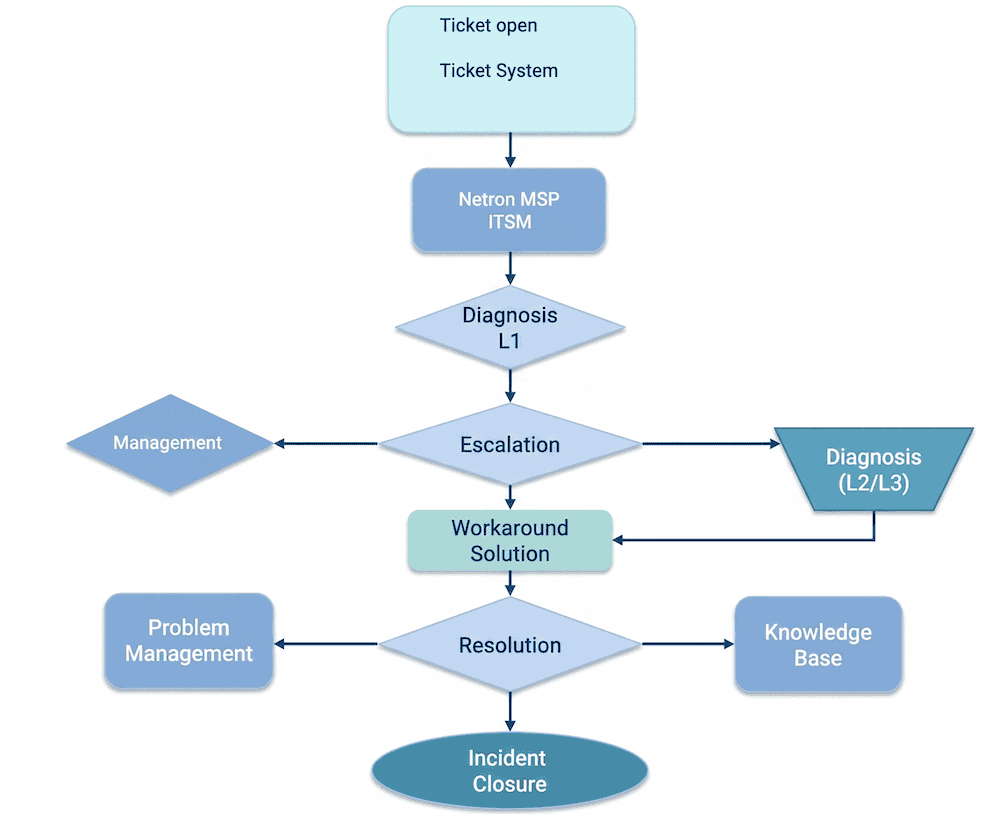
MSP Managed Services Highlight: Ticketing System (Fresh Service)​

Support Portal Ticketing System — Transparent, Trackable Support Process​
Complete Interaction History Full conversation history and technical recommendations in every ticket. Easy to track and reference.
Clear Issue Classification Categorize by service type and submitter for effective demand tracking
Visual Support Trend Reports Monthly ticket volume, interaction count, and category analysis reports
Response Time Monitoring Quantitatively track first-response time for each ticket, strengthening SLA management
Centralized Support Portal Integrate technical support and consulting into a single platform
Standardized Process Systemize operations to prevent information gaps and unclear ownership

NETRON MSP Managed Services — Incident Priority Levels

Priority Incident Definition Resolution Focus
P1:
Critical Impact—Service Unusable in Production
  • Critical Business Impact
  • Revenue loss or potential data integrity issues
  • No alternative solution achievable within 30 minutes
  • Restore core service availability as the primary objective
  • Apply temporary workarounds to minimize business disruption
  • Continuously update incident status until resolved
  • Initiate architectural-level adjustments if needed (traffic switching, scaling, fault isolation)
P2:
High Impact—Service Use Severely Impaired
  • High Business Impact
  • Degraded production performance, rising error rates, or difficulty launching new production systems
  • Potential revenue loss or reduced productivity
  • Workarounds available to reduce impact on critical operations
  • Prioritize restoring affected functionality
  • Investigate error source and execute remediation to reduce recurrence
  • Adjust resources as necessary
  • Ensure system quality returns to acceptable levels without affecting core business processes
P3:
Medium Impact—Service Use Partially Impaired
  • Limited scope and/or severity; impact largely unnoticeable to end users
  • Minimal business impact. Can cause inconvenience or affects secondary processes
  • Requires in-depth investigation with lower communication frequency
  • Root cause analysis and improvement recommendations
  • Schedule fixes or optimizations based on impact severity
  • Assist with configuration, resource, or architecture adjustments to improve stability
  • Long-term improvements where necessary
P4:
Low Impact—Service Fully Usable
  • Little to no business or technical impact
  • Best handled through in-depth analysis or advisory rather than frequent communication
  • Provide technical assistance, configuration guidance, or best practices
  • Answer usage questions and assist with system tuning
  • Provide future recommendations without impacting current service

Contact Netron Information Technology today to start your cloud journey!

Scroll to Top