技術分享與學習資源
Do you need to call the Kubernetes API directly to get the k8s cluster information? This cluster information could be anything you get from the kubectl command. And, Do you need to make this happen in a pod? If your answer is “yes yes”, here is my sample of how I use the curl command to call the K8s API within a pod.
In fact, the kubectl command also provides you the curl command to call the K8s API. Let’s check out the logs.
					# means comment, $ means command prompt

# I create an alias "k" for kubectl

$ alias k=kubectl

# I add "-v 9" to change the kubectl verbosity level to 9

$ k get no -v 9
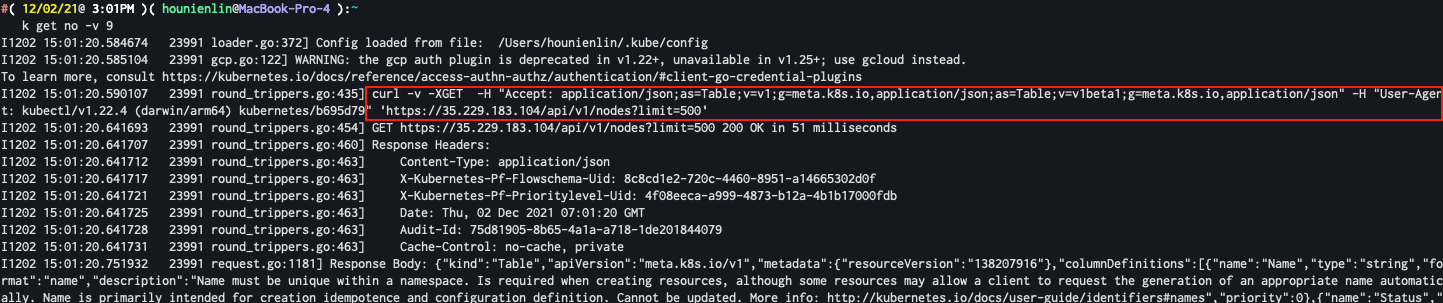
You can see the curl command is in the red block. BTW, I also provide a snapshot of kubectl verbosity level for your information.
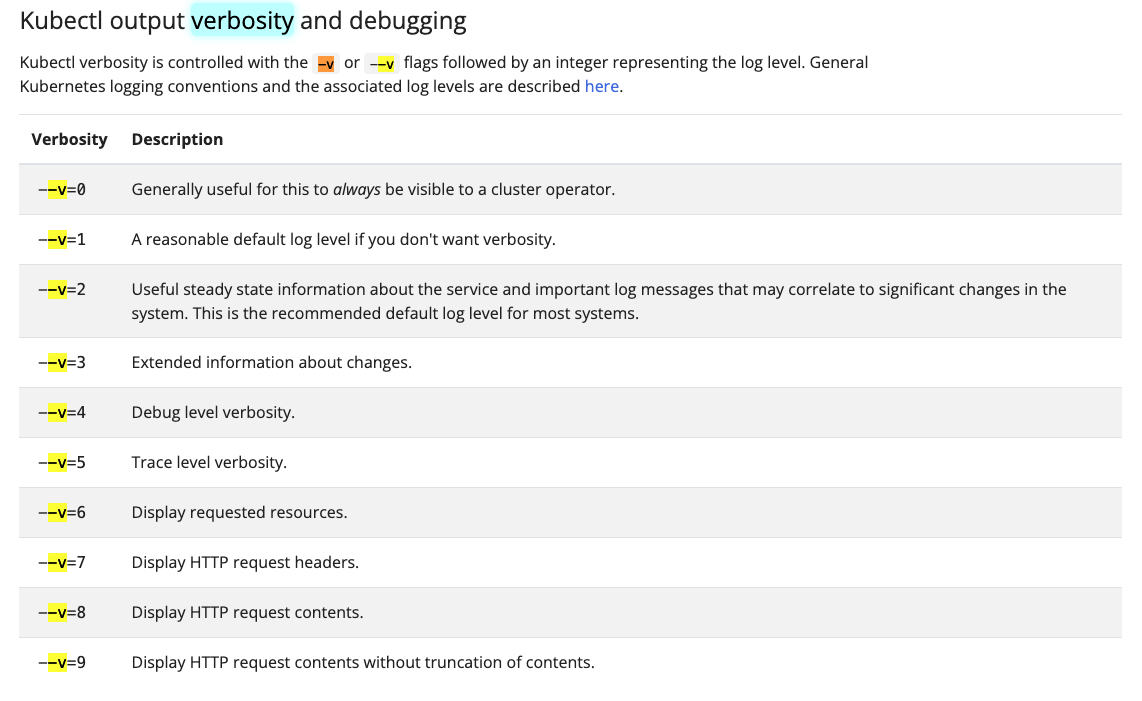
The snapshot is from here
					# Sample Script

# Point to the internal API server hostname
APISERVER=https://kubernetes.default.svc

# Path to ServiceAccount token
SERVICEACCOUNT=/var/run/secrets/kubernetes.io/serviceaccount

# Read this Pod's namespace
NAMESPACE=$(cat ${SERVICEACCOUNT}/namespace)

# Read the ServiceAccount bearer token
TOKEN=$(cat ${SERVICEACCOUNT}/token)

# Reference the internal certificate authority (CA)
CACERT=${SERVICEACCOUNT}/ca.crt

# Explore the API with TOKEN
curl --cacert ${CACERT} --header "Authorization: Bearer ${TOKEN}" -X GET ${APISERVER}/api/v1/namespaces/default/pods/ingress-nginx-ingress-controller-6cbf95f5d4-d628h/log
In order to have pods to access api, we need to define service account, role, rolebinding in the yaml file.
- sa_role_rolebinding.yaml – I took some time to figure out how to get resource log. In the Role configuration, I added “pods/log” in the resources then it finally worked for me.
					---
apiVersion: v1
kind: ServiceAccount
metadata:
  name: ing-api-call-sa
  #namespace: gitlab-managed-apps
---
apiVersion: rbac.authorization.k8s.io/v1
kind: Role
metadata:
  name: ing-api-call-role
  #namespace: gitlab-managed-apps
rules:
  - apiGroups: [""]
    resources:
      - pods
      - pods/log
    verbs:
      - get
      - list
---
apiVersion: rbac.authorization.k8s.io/v1
kind: RoleBinding
metadata:
  name: ing-api-call-roldbinding
  #namespace: gitlab-managed-apps
subjects:
  - kind: ServiceAccount
    name: ing-api-call-sa
roleRef:
  kind: Role
  name: ing-api-call-role
  apiGroup: rbac.authorization.k8s.io
- new_pod.yaml – Just in case, I might use some tools that base linux image doesn’t offer, so I choose to use the ubuntu image for this testing.
					apiVersion: v1
kind: Pod
metadata:
  name: ubuntu-test
  #namespace: gitlab-managed-apps
spec:
  serviceAccountName: ing-api-call-sa
  containers:
    - name: ubuntu
      image: ubuntu:latest
      command: ["sleep", "365d"]
Deploy and Test in the K8s cluster
My sample is to collect ingress controller pod logs, so I have to specify the resources to access.
deployment steps
					$ alias k=kubectl
$ k apply -f sa_role_rolebinding.yaml
$ k apply -f new_pod.yaml
$ k get pod
$ k exec -it [new_pod] -- bash

In the ubuntu prompt,

$ apt update && apt upgrade && apt install -y curl vim

$ vi apt-test.sh

cut and paste the sample script.

$ chmod +x apt-test.sh
$ ./apt-test.sh
Remember to modify the name of ingress-controller pod. If your ingress-controller running in different namespace, you have also to modify the curl arguments.
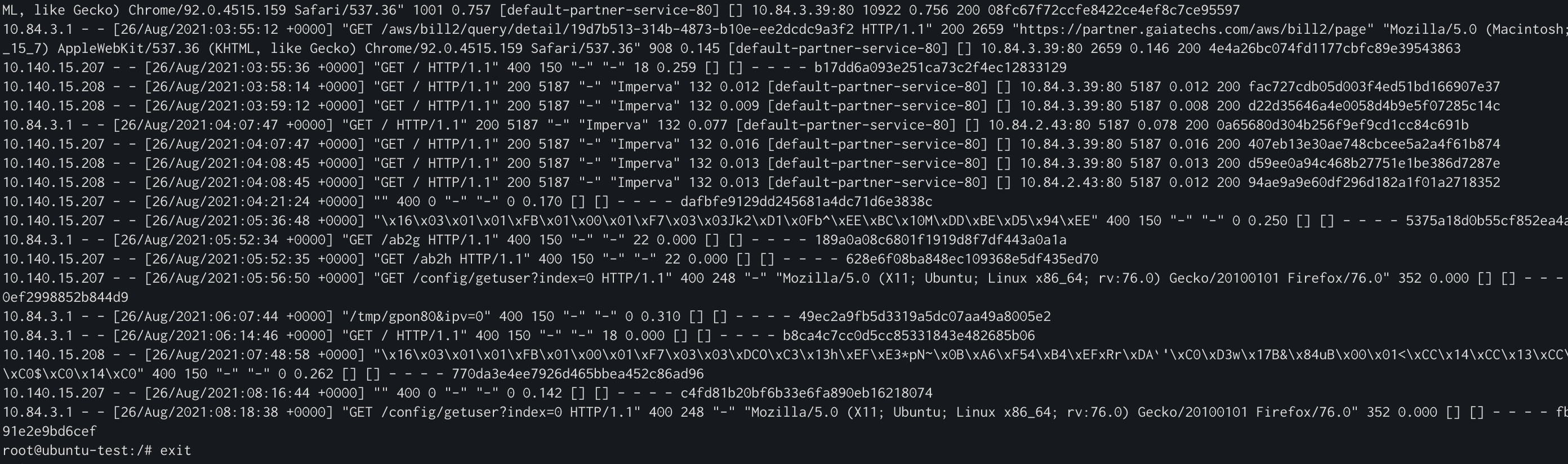
If you configured the yaml and script correctly, you will see the below figure. Congrat~~
Clean up the test settings
					$ k delete -f sa_role_rolebinding.yaml
$ k delete -f new_pod.yaml
more about the curl arguments
I didn’t automate the URL handling for setting up the namespace and pod name. We definately have different pod name, so don’t forget to change the pod name or namespace.
curl --cacert ${CACERT} --header "Authorization: Bearer ${TOKEN}" -X GET ${APISERVER}/api/v1/namespaces/default/pods/ingress-nginx-ingress-controller-6cbf95f5d4-d628h/log
The url is
${APISERVER}/api/v1/namespaces/default/pods/ingress-nginx-ingress-controller-6cbf95f5d4-d628h/log
my case is
- my ingress controller is running in default namespace
- find your ingress pod name by
k get po -A|grep ingress
I hope this can help. 🙂 If you don’t know how to set up ingress controller, you can use helm to install it. For more details, please click here
					helm upgrade --install ingress-nginx ingress-nginx \
  --repo https://kubernetes.github.io/ingress-nginx \
  --namespace ingress-nginx --create-namespace
Summary
In this article, I shared my example of how I use the curl command to call the K8s API. The next step I would like to make a small docker image instead of the ubuntu one and use the new docker image to run a cronjob to get the IP information periodically.
Please feel free to let us know if you have questions or any.
Reference
https://kubernetes.io/docs/tasks/run-application/access-api-from-pod/https://itnext.io/running-kubectl-commands-from-within-a-pod-b303e8176088
Netron網創資訊為擁有豐富上雲經驗的 AWS 代理商,更是 AWS 進階合作夥伴,並取得AWS MSP、MSSP、Migration、Generative AI Competency 認證資格。擁有兩百多張平台認證的技術維運團隊也深受 AWS 原廠信賴,Netorn網創資訊結合自身多雲平台、資安防護、AI、Big Data 等關鍵技術,都能為企業提供全方位的 AWS 雲端服務,可給予企業最專業的 AWS 雲端架構規劃與設計諮詢。
如需進一步了解我們的公部門雲端服務解決方案,歡迎聯絡我們。